
Hey, PC builders and budget warriors! I’ve spent countless hours diving deep into the world of cheap GPUs for 1080p so you don’t have to. Let’s be honest, not everyone needs or can afford a flagship card. We’re here for the value, the bang-for-your-buck component that lets you crush your favorite games without crushing your wallet. Right now, finding a best budget graphics card under $150 is the ultimate scavenger hunt, but I’ve done the heavy lifting and found the absolute best options for a smooth 1080p experience.
Table of Contents
Why Budget GPUs are More Important Than Ever
The current component market is a wild place. Prices fluctuate, and it can feel like you need a second mortgage just to get a good frame rate. But here’s the secret: the most satisfying feeling in the world is getting great performance from a seemingly entry-level gaming PC. We are targeting the 1080p sweet spot—the most common resolution where a smart affordable PC build and a fantastic sub-$150 GPU can truly shine. We’re prioritizing high FPS in e-sports titles and medium-to-high settings in modern AAA games.
My Top 3 GPU Picks Under $150
I’ve narrowed the list down to three distinct champions in the $150 graphics card benchmarks space, often requiring you to look for sales, open-box deals, or reliable used markets.
Pick 1: The All-Around Champion: AMD Radeon RX 6600
This card is my go-to recommendation. It consistently delivers 60+ FPS in most titles at 1080p Medium settings. When you combine its raw power with a solid CPU, you have a winning, entry-level gaming PC component foundation. Before you finalize any budget purchase, make sure you know exactly how much memory your games will demand by consulting our in-depth GPU VRAM Calculator Guide.
Pick 2: The E-Sports Specialist: NVIDIA GeForce GTX 1660 SUPER
For those who live and breathe Valorant, CS2, or Rocket League, this is your GPU. It may have slightly less VRAM, but its superior power efficiency and driver support means better frame consistency and lower input lag. It’s perfect for the builder prioritizing a high-refresh-rate monitor experience on a tight budget.

Pick 3: The Best for Used/Refurbished Deals: AMD Radeon RX 5700 XT
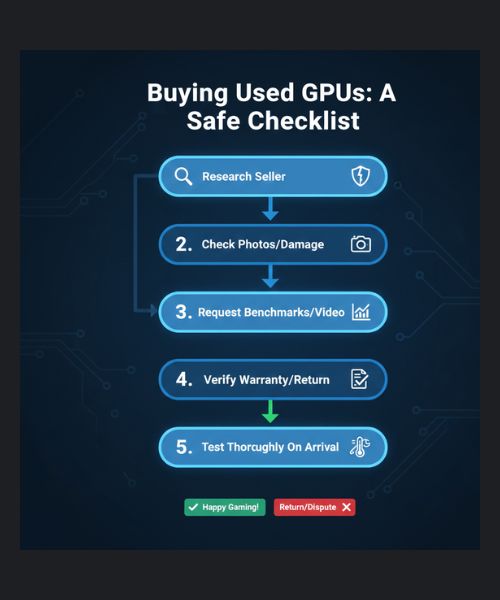
If you’re comfortable diving into the used market, this model is a powerhouse when found at the right price. My advice? Only buy from reputable sellers and always check their return policy. You can get near-flagship performance from a few generations ago for dirt cheap. Check for signs of damage and run a simple benchmark to ensure stability before you consider the deal done.
What to Compromise: Specs That Matter (And Those That Don’t)
When shopping for budget gaming GPU recommendations, you have to make trade-offs.
- VRAM: Try to aim for 8GB if possible. While 4GB can work, 6GB is fast becoming the minimum for modern titles, and 8GB gives you much better future-proofing for textures.
- Ray Tracing: Forget it. At this price point, Ray Tracing will cripple your frame rate. It’s a nice-to-have, but not a necessity for 1080p gaming.
- Software Tweaking: Once you have your budget card installed, don’t leave performance on the table. You can squeeze out extra frame rates with software tools—read our ASUS GPU Tweak III Optimization Guide for my exact methods.
Final Verdict: Building the Complete Budget Rig
The quest for the best budget graphics card under $150 is ultimately about being a smart shopper. It’s an active hunt where deals come and go fast. My goal with this guide was to give you the blueprint for what to look for and what to absolutely avoid. Go forth and conquer your 1080p gaming goals—you don’t need a thousand-dollar GPU to have an amazing time!
Frequently Asked Questions (FAQ)
Q1: Is 4GB of VRAM enough for 1080p gaming in 2025?
A: No, generally 4GB of VRAM is no longer enough for a comfortable 1080p experience in modern AAA games, as it will cause stuttering when textures are loaded. We recommend aiming for a minimum of 6GB, with 8GB being the sweet spot for future-proofing your budget graphics card.
Q2: Should I buy a used budget GPU over a new one?
A: Buying a used GPU can offer better performance for the same price, but it carries risk. I recommend only buying used if the card is tested, the seller is reputable, and you have a solid return policy. Always prioritize new models when performance differences are minor.
Q3: What CPU pairs best with a GPU under $150?
A: To avoid bottlenecking, pair a sub-$150 GPU with a modern quad-core CPU (like a recent i3 or a Ryzen 3) or a previous-generation six-core processor (like the Ryzen 5 3600 or i5-10400F). The focus should be on strong single-core speed to handle modern game logic.
Q4: How important is the PCIe generation (Gen 3 vs Gen 4) for budget GPUs?
A: For budget graphics cards under $150, the difference between PCIe Gen 3 and Gen 4 is typically negligible in terms of FPS, so don’t worry about it. You can confidently install a cheap Gen 4 card on a Gen 3 motherboard without losing noticeable performance.

