
Do you want to know how to split screen in Fortnite? Fortnite is a famous online video game by Epic Games. It was released in 2017 and currently has three different game modes. And Fortnite comes with many exciting features. The Split Screen feature can make playing time more fun and engaging. This guide will tell you how to split screen in Fortnite.
How To Split Screen in Fortnite?
These are the steps to enable the split screen feature in Fortnite.
- Sign in to your Fortnite account.
- Head to the game’s main lobby on the primary player’s account.
- Turn on the second controller.
- Log in to the second player’s account.
- Look for the Login/Hold button in the downright corner. (It comes with a triangle symbol for PlayStation or Y for Xbox.)
- That will take you to a ‘Loggin in…’ screen. Once you successfully log in, both players will appear in the lobby area of the game.
- Click the game you want to play.
- The Ready Up button will appear. Wait until the game loads after the matchmaking process.
- The game will load with a split-screen feature. You’ll see characters controlled by two controllers on the same screen.
Things to remember about the split screen in Fortnite
- The split-screen session will end as soon as one of the players leaves the game or disconnects from it.
- The split-screen feature is only active during actual gameplay, and sharing the lobby or any of the sub-menus is impossible.
- When playing in split-screen mode, players cannot share their inventories.
- Both players’ language selection needs to be the same to play split-screen.
- It is impossible to play in split-screen mode on mobile devices, Nintendo Switch, or PC platforms; also, Creative and Limited Time Modes, Save the World, Ranked Mode, and Solos do not support this feature.
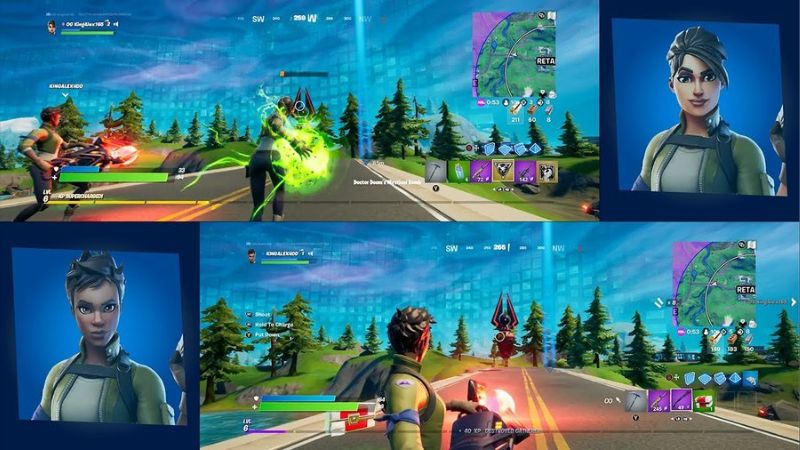
Image source: Epic Games Screenshot via Brani
Related
How To Get All Legends Landing Rewards in Fortnite
What Is Split Screen in Fortnite?
Split Screen in Fortnite can enable two players to share the same screen, and you will not need an additional console. This is a great way to enjoy the game with friends and family. This feature was on and off but became permanent since Fortnite Chapter 3, Season 1. The sad thing about the split screen is that it is only available with PlayStation and Xbox platforms and only allowed in Duos and Squad modes. Also, remember that a split screen will split your screen, which means you’ll lose the full vision of the game screen.
Fortnite is available on PC, PS4/PS5, and XBOX.
Source: Brani, Epic Games

