Do you want to know how to Holster Handgun in Cyberpunk 2077 Phantom Liberty 2.0? In the immersive world of Cyberpunk 2077, understanding the game’s mechanics is crucial for survival. One such mechanic is the ability to holster your handgun. This action helps maintain a low profile in Night City. It plays a significant role in non-lethal playthroughs and interactions with NPCs. This guide will tell you how to Holster Handgun in Cyberpunk 2077 Phantom Liberty 2.0.
Cyberpunk 2077 Phantom Liberty 2.0: How To Holster Handgun
Holstering your handgun in Cyberpunk 2077 is a simple process. To do so, double-tap the weapon select button, which varies depending on your platform – Y for Xbox, Triangle for PlayStation, and Left Alt for PC. This action will safely put away your current weapon, making you appear less threatening to the non-playable characters nearby.
If you’re in the driver’s seat of a vehicle, tapping Y/Triangle will draw your weapon. You can aim by holding LT/L2 and shoot with RB/R1. You can reload by pressing X/Square, holstering with B/Circle, and using consumables with the Up button on the D-pad.
You cannot cycle Mantis Blades or Gorilla Arms using Y/Triangle. Please note this. You must press and hold the Y/Triangle button to access the quick access menu and freely select all active weapons, including Mantis Blades or Gorilla Arms.
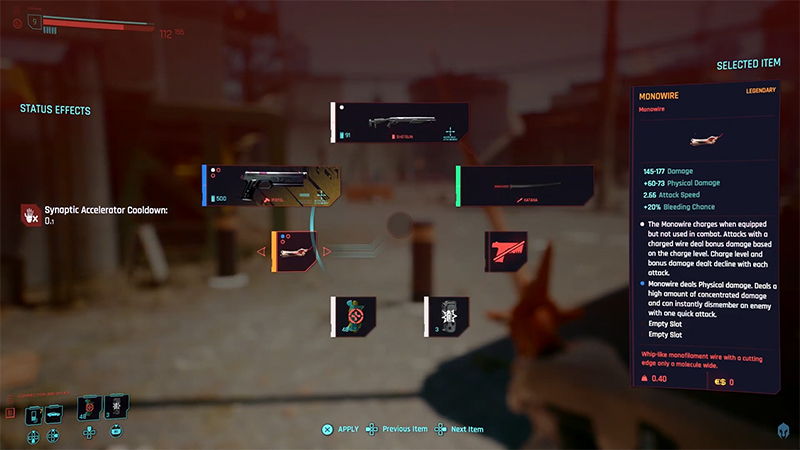
Image Source: CD Projekt via Gamers Heroes screenshot
Related:
River’s Photo Is Fixed in Cyberpunk
How To Fix Can’t Hostler Weapon Or Open Weapon Wheel In Cyberpunk 2077
If you’re struggling with holstering your weapon or opening the weapon wheel in Cyberpunk 2077, there are a few possible solutions you can try:
- Check your key bindings: Ensure that your critical bindings for holstering your weapon and opening the weapon wheel are set up correctly. You can do this by pressing Esc, clicking Settings, and then Key Bindings. Scroll down to Cycle Weapon and input your preferred key instead. Changing this key bind will also change the key spot for bringing up the weapon wheel.
- Double-tap Alt: Some players have found that tapping the Alt key twice quickly can help holster your weapon.
- Look for game updates: If the issue persists, a game bug might be causing it. Check for any updates for Cyberpunk 2077, as these often come with bug fixes.
- Restart your game or system: Restarting your game or system can sometimes fix minor glitches.
- Turn off mods: If you’re using any mods, disable them to see if they’re causing the problem.
Remember that if none of these solutions work, it could be worth contacting CD Projekt Red’s support team for further assistance.
If you want to know about Cyberpunk 2077 Phantom Liberty Update, watch the video below by ESOdanny.

