
If you want to know how to give a hire specialist a command in Fortnite, this guide will tell you how to provide a hire specialist a command in Fortnite. It is also a popular online multiplayer game that offers players a variety of customization options, including hiring specialist NPCs to fight alongside them. These specialist characters can be precious assets on the battlefield. But knowing how to command them effectively can be challenging. This blog post will provide a comprehensive guide, including the commands and the best strategies for using them to your advantage.
How to Give a Hire Specialist a Command in Fortnite?
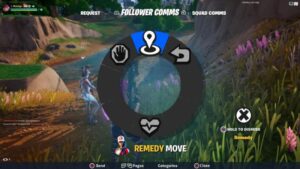 Open the command menu to give a hire specialist a command in Fortnite.
First, choose a preferred specialist, and proceed to the location to recruit them onto your team. It’s also important to note that not all NPCs possess specialist skills, and therefore use a guide on NPC locations to ensure that you hire the right one.
After recruiting a specialist into your team, you can access a command menu. Click on the button below your name and the health bar on your user interface. It can be found in the top left corner of your screen. It’s worth noting that the specific button used to access this menu may vary depending on your gaming platform.
Related
Fortnite: Where to Find Lily Pad Tire and Air Vent
You can issue various commands to your specialist with the command menu open. This includes requesting them to follow, wait, or move to a specific location. If you get knocked down, you can also use this feature to request that they come to revive you.
Suppose your primary objective is to complete the Spring Breakout Event challenge related to this task. In that case, you can select any options in the command menu. This will instantly be marked as completed.
Hiring a specialist and giving them commands is crucial to successful gameplay in Fortnite. With the help of the command menu, players can issue a variety of instructions to their specialist, such as asking them to follow, wait or move to a specific location. This feature is also helpful during intense battles when you need to be revived or need extra support. By following the steps outlined in this post, you can easily navigate the hiring process and effectively communicate with their specialist to achieve their goals in the game. Mastering this skill will enhance gameplay and increase your success in Fortnite.
Fortnite is available on PC, PS4/PS5, XBOX
Sources Gamespot,Trophygamers

