
Why Your Card is Overvolted
If you followed my advice and bought the budget graphics card under $150 (the RX 6600), you made a smart choice. But out of the box, AMD feeds this card way more voltage than it actually needs. They do this to ensure that the “worst” silicon off the assembly line still runs stable. But you likely didn’t get the worst chip—so you’re just turning that extra electricity into useless heat.
My philosophy is simple: efficiency equals longevity. If we can get the same FPS with less heat, your fans spin slower, and your card lasts longer. It’s the ultimate “free upgrade.”

Aim for 1080mV—that’s the magic number where heat drops but frames stay high.
Step-by-Step: The Adrenalin Method
You don’t need sketchy third-party tools. AMD’s own driver software is excellent for this. Here is the exact process I use in my lab for every RX 6600 that crosses my bench:
- Open AMD Software: Adrenalin Edition.
- Navigate to the Performance tab and select the Tuning sub-tab.
- Under “Manual Tuning,” click Custom.
- Enable GPU Tuning and Advanced Control.
- Find the “Voltage (mV)” slider. The stock is usually 1150mV.
- The Fix: Drop this to 1080mV.
Leave the Frequency Max at its default (usually around 2490MHz). We aren’t overclocking today; we are optimizing.
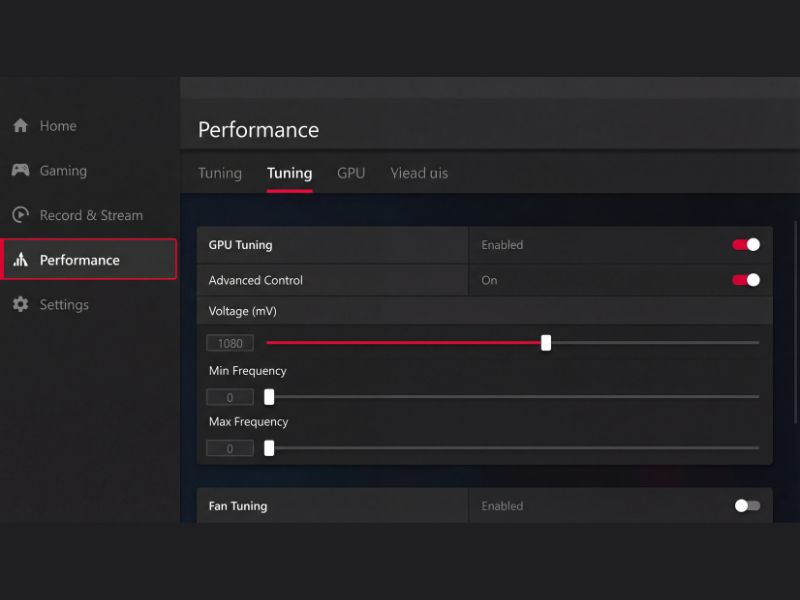
Don’t be scared of the ‘Manual’ button; it’s the only way to unlock your card’s real potential.
Stability: Don’t Crash Mid-Game
You aren’t done yet. You need to prove that your card is happy with this lower power diet. I recommend running a benchmark like Unigine Superposition for 30 minutes. If it crashes, bump the voltage up to 1090mV and try again.
If you find that your temps are still creeping up despite the undervolt, you might have an airflow problem, not a voltage problem. Check out my guide on what to do if GPU temperature is high to rule out other causes like a dirty case or bad fan curves.
Undervolting FAQ
Is undervolting the RX 6600 safe?
Yes, it is safer than running at stock settings. By lowering voltage, you reduce heat and electromigration, actually extending the card’s lifespan.
Will I lose FPS by undervolting?
Typically, no. If done correctly, you maintain the same clock speeds but with less power. In some cases, FPS actually increases because the card no longer hits its thermal limit and throttles down.
Do I need to re-apply this every time I reboot?
AMD Adrenalin should save your profile, but it has a bad habit of resetting if the system crashes. I recommend saving your settings as an XML profile so you can reload it instantly.

