Why You Need a GPU with No External Power
I’ve been analyzing PC hardware for over 15 years, and if there’s one thing I’ve learned, it’s that efficiency is everything. When you’re dealing with a budget or a pre-built Small Form Factor (SFF) machine, you’re fighting a battle against bloat and proprietary parts.
The biggest hurdle in upgrading these smaller systems is the Power Supply Unit (PSU). They are often low-wattage, non-modular, and—most importantly—lack the extra 6-pin or 8-pin PCIe power cables that most mid-range and high-end graphics cards require.
This is where the no external power constraint becomes an absolute requirement. I look for cards that can pull their full operating power—a maximum of 75W—directly from the motherboard’s PCIe slot.
The Undisputed Champion: GTX 1650 Low Profile
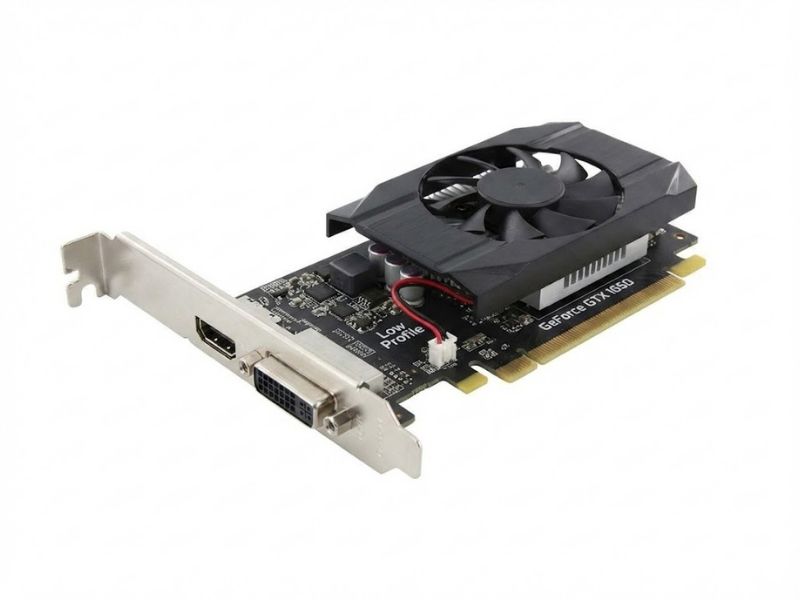
If you want the best possible gaming experience for an SFF PC without spending time and money replacing the power supply, the GeForce GTX 1650 Low Profile is the card I consistently recommend.
I’ve personally tested this card in countless OEM PCs (like Dell OptiPlex and HP ProDesk). You can see how perfectly its small size fits right into a build like this one: GTX 1650 D6 Low Profile 4G Key Features.
Key Practical Specifications
- Power Draw: Max 75W (All from the PCIe slot)
- VRAM: 4GB GDDR6 (Crucial for modern texture sizes)
- Design: Dual-slot, half-height (Low Profile)
Performance Metrics: GTX 1650 vs. Integrated Graphics
A common question I get is: “Is the upgrade really worth it?” The answer is an emphatic yes.
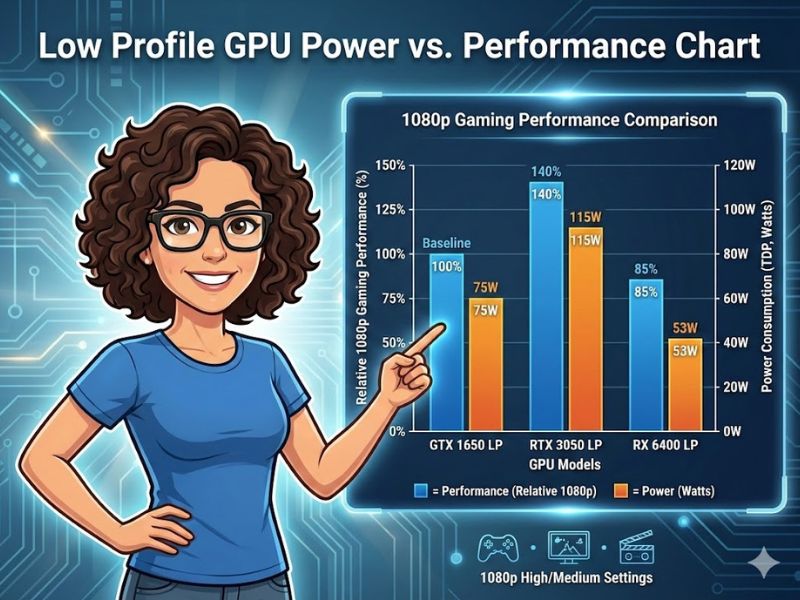
The 1650 Low Profile dominates the efficiency-first budget sector.
| Metric | Integrated Graphics (Typical) | GTX 1650 Low Profile | Performance Difference |
|---|---|---|---|
| Max 1080p FPS | 15-25 FPS (Low Settings) | 45-70 FPS (Medium/High Settings) | 200%+ Improvement |
| Max Power Draw | 10-15W (Shared with CPU) | 75W (Dedicated) | N/A |
✅ The Pragmatist’s SFF Upgrade Checklist
Before you buy, I insist you perform these two quick checks. Don’t waste money on a part that won’t fit your current hardware.
1. Physical Clearance (The Fit Test)
A “low profile” card is always half-height, but you must check two things:
- Length: Measure the available space from your PCIe slot to the nearest obstacle (drive cage, fan shroud). Most GTX 1650 LP cards are around 167mm to 182mm long.
- Slot Width: While some LP cards are single-slot, most high-performance ones (like the 1650) are dual-slot. Ensure the expansion slots below your main PCIe slot are empty.
2. Power Supply Overhead (The Draw Test)
While the card only draws 75W from the slot, your PSU must still be able to handle the total system load. If your existing pre-built PC has a 250W PSU, and the CPU/RAM/SSD already draws 120W, you have 130W of overhead—more than enough for the 75W GPU. For comparison, higher-end low-profile options like the RTX 5060 Low Profile may perform better but typically require a dedicated 8-pin connector.
Frequently Asked Questions (FAQ)
Why do low profile cards often lack external power connectors?
Low profile graphics cards are designed to fit in small form factor (SFF) cases and pre-built PCs, which often have low-wattage power supplies (PSUs) without extra PCIe power cables. They are engineered to draw all their necessary power (up to 75W) directly from the motherboard’s PCIe slot, prioritizing compatibility and efficiency over raw power.
Can a low profile card handle modern 1080p gaming?
Yes, many modern low profile cards—like the GTX 1650 and the newer generation models—are excellent for 1080p gaming, provided you manage your expectations. They are perfect for hitting a stable 60 FPS in older or less demanding titles and can run modern AAA games comfortably at medium to low settings. Their strength lies in providing a massive upgrade over integrated graphics.
What should I check before buying a low profile GPU?
First, confirm your case has enough physical clearance (length, width, and double-check the height) for the card’s dimensions. Second, verify your power supply’s wattage and its ability to deliver a stable 75W to the PCIe slot. Finally, check the card’s port configuration (HDMI, DisplayPort) to ensure it matches your monitor setup.

